[$4,500] Remote Code Execution Vulnerability in Meta's Manus AI
Introduction
Hi, I am Zaizen, an engineer at INDX. My day-to-day work focuses primarily on LLM security.
While comparing AI agents for an internal technical meetup, I learned that Manus AI, which attracted considerable attention last year, had released a desktop application.
Manus AI's desktop application announcement
Security Concerns Around Desktop AI Agents
AI agents need a certain level of system access to be genuinely useful. At the same time, vulnerabilities specific to LLM-based systems, including prompt injection, continue to be reported.
Installing an agent on my primary machine would therefore carry meaningful risk. Before doing so, I decided to identify the application's security risks.
Initial Analysis
Manus My Computer is built with Electron. Electron applications often package their JavaScript and other application resources inside an archive named app.asar.
$ npx asar extract app.asar /tmp/manus_asar$ ls /tmp/manus_asar/dist/
autoUpdaterManager.js index.js myComputer/ preload.js setupIPC.js utils/ windowManager/| File | Role |
|---|---|
index.js |
Startup and Deep Link handling |
myComputer.js |
Main implementation of the My Computer feature |
sidecarManager.js |
Launch and lifecycle management for the helper process |
storageHelper.js |
Persistent storage handling |
Vulnerabilities Found
1. An arbitrary token could be injected through a Deep Link
In index.js, I found code that registers the manus:// Deep Link scheme.
const APP_PROTOCOL = 'manus';
// ...
app.setAsDefaultProtocolClient(APP_PROTOCOL);
A Deep Link, also known as a custom URL scheme, is commonly used to launch a desktop application from a browser or another application. For example, when a user opens manus://example, the operating system passes that URL to the registered application.
function handleProtocolCallback(urlStr) {
    try {
        const parsedUrl = new URL(urlStr);
        const token = parsedUrl.searchParams.get('token');

        if (parsedUrl.hostname === 'create-website') {
            // ...
            return;
        }

        if (token) {
            storageHelper.set('hideGuide', 'true');
            storageHelper.set('session_id', token);
            myComputer.reinit(token);
            windowManager.broadcast('login-success', { token });
            shortcutManager.setup();
            windowManager.preWarmQuickAsk();
        }
    } catch (error) {
        console.error('Failed to handle protocol callback:', error);
    }
}
The problem is how the token supplied through the Deep Link is handled. If the URL contains a value such as manus://...?token=..., the application stores that value as session_id.
When an authentication token is accepted from external input, the application should verify that the incoming URL is a response to an authorization flow initiated by the application itself, typically using a random state value. Native applications using OAuth should also avoid receiving tokens directly through URLs and instead use an authorization code with PKCE. I found no such validation here.
If a user opened a crafted Deep Link, an attacker could replace the application's token with an attacker-selected value.
2. The application reconnected using the supplied token
handleProtocolCallback() calls myComputer.reinit(token).
async reinit(token) {
    loggerHelper.warning(
        'reinitializing my computer for account switch:', token
    );

    if (token) {
        storageHelper.set('token', token);
    } else {
        storageHelper.remove('token');
    }

    this.isSocketReady = false;
    this.stopAllSidecars();
    this.sessions.clear();
    this.sharedFolders = [];
    this.socketClient.disconnect();
    this.appliedConfigVersion = 0;
    this.socketClient.removeAllListeners();

    if (!token) return;

    await this.init();
}
The token supplied in the URL was not merely persisted. It was immediately used to reinitialize the application through init().
reinit() stops the existing sidecars and sessions, then reconnects to Manus Cloud using the supplied token.
3. The sidecar could be launched through the cloud
Manus My Computer communicates with Manus Cloud over WebSocket and handles an event named device_config sent by the cloud service.
handleDeviceConfigMessage(message) {
    const deviceId = getOrGenerateDeviceId();

    if (message.deviceId !== deviceId) {
        loggerHelper.warning(`device config for unexpected device`);
    }

    this.sharedFolders = message.folders?.map(f => ({
        path: f.path,
        name: f.name,
        allowCmd: f.allowCmd
    }));

    this.enqueueOperation(() =>
        this.applySessionConfig(message.sessions)
    );
}
When the event arrives, the application updates its local configuration using values received from the cloud. Even if message.deviceId does not match the current device ID, the application only logs a warning and continues processing the message.
Path to Remote Code Execution
The sidecar process is launched with two arguments:
sidecarManager.jsspawnProcess(sharedFolder, wsUrl) {
const binaryPath = this.resolveSidecarBinary();
const child = spawn(binaryPath, [
'--shared-folder', sharedFolder,
'--ws', wsUrl
], {
detached: process.platform !== 'win32',
stdio: 'ignore',
env: { ...process.env, PARENT_PID: String(process.pid) },
});
return child;
}The important detail is that wsUrl is passed directly to the sidecar as its connection destination.
validateSharedFolder(pathValue) {
    const trimmed = pathValue.trim();
    let stats = fs.statSync(trimmed);

    if (!stats.isDirectory()) {
        throw new Error(`not a directory`);
    }

    return fs.realpathSync(trimmed);
}
The shared-folder validation checks whether the path is a directory, but it does not verify that the user authorized access to that folder.
I then examined the sidecar binary for strings related to terminal execution and communications.
$ file /Applications/Manus.app/Contents/Resources/bin/sidecar
Mach-O 64-bit executable arm64
$ strings sidecar | grep -E "terminal|pty|shell|exec|websocket|protobuf|bridge" | head -40
*main.terminalSession
*main.terminalManager
*main.ptyHandle
*main.unixPtyHandle
*exec.Cmd
*exec.ExitError
.terminal.v1.EnvelopeH
.terminal.v1.RequestH
.terminal.v1.ResponseH
*bridgev1.Envelope_Terminal
*bridgev1.Envelope_Sandbox
github.com/gorilla/websocket
google.golang.org/protobuf
/bin/sh| String | Indication |
|---|---|
terminal |
Terminal session management |
pty |
Pseudoterminal handling through PTYs |
exec, /bin/sh |
Local command execution |
websocket |
WebSocket communications |
protobuf |
Message processing using Protocol Buffers |
The protobuf structure tags also revealed a field containing the command to execute.
$ strings sidecar | grep 'protobuf:"' | grep -E "terminal|command|exec_dir|sandbox|bridge" | head -30message Envelope {
oneof msg {
bytes sandbox = 1;
bytes terminal = 2;
}
}
message Request {
string type = 1;
string command = 4;
}Putting the pieces together, the following sequence led to remote code execution:
- The attacker convinces the victim to open a Deep Link containing an attacker-selected token.
- Manus My Computer accepts the token and reconnects to Manus Cloud.
- The attacker sends
device_configthrough Manus Cloud, causing the sidecar to launch on the victim's machine. - The sidecar receives instructions over WebSocket and executes a command on the victim's machine.
manus:// Deep Link
The victim opens a URL containing the attacker's token.
reinit() reconnects Manus My Computer to Manus Cloud using the injected token.
device_config
The configuration launches the sidecar with a WebSocket endpoint.
Bug Bounty Report
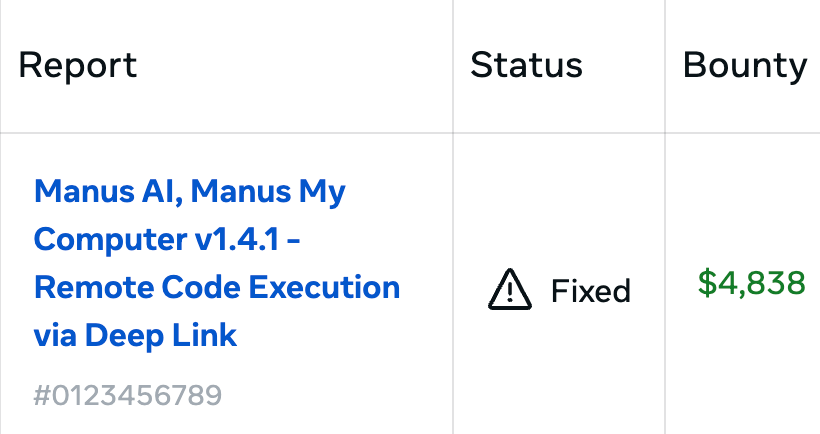
I initially reported the vulnerability directly to Manus AI. The following day, Manus AI became eligible under the Meta Bug Bounty program, and I received a total reward of $4,838.
Original Japanese Article
This write-up is an English translation of my original Japanese article:
 LinkedIn
 Wantedly
 X
X GitHub